

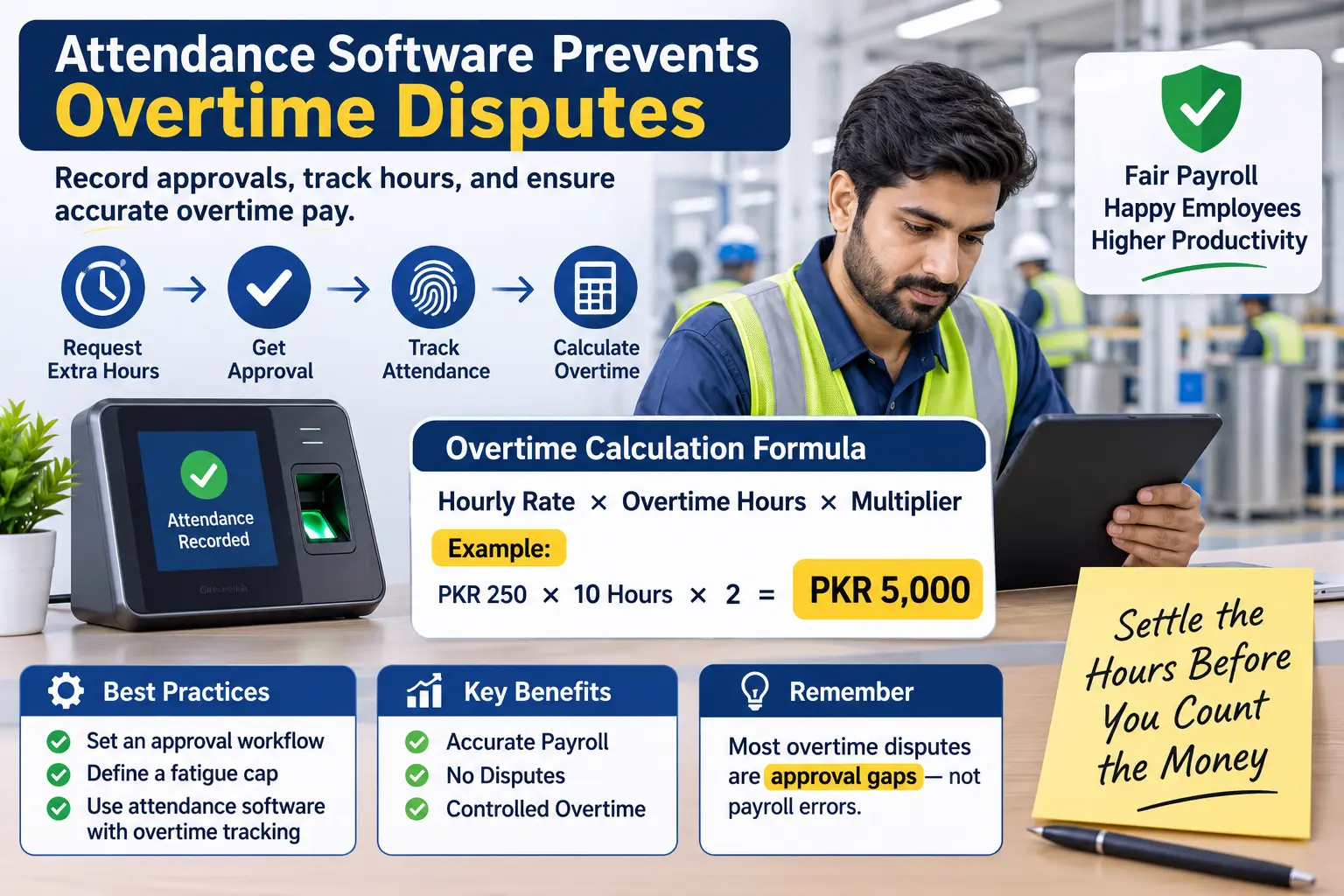
Attendance software prevents overtime disputes by recording approval, hours, and pay rules before payroll runs. For overtime calculation, use this formula: hourly rate x overtime hours x multiplier. For example, PKR 250 x 10 hours x 2 equals PKR 5,000. Pairing a pre-approval workflow with a fatigue cap keeps pay accurate and protects output, because performance drops once long shifts pass a threshold.
Most overtime disputes are not payroll errors. They are approval gaps. An employee stays late, a supervisor nods, and nobody records the decision. At month end, overtime calculation becomes an argument over hours nobody can prove, and HR sits in the middle.
The fix is a workflow, not a bigger calculator. Attendance software for payroll accuracy captures the request, the approval, and the punch data in one place, so payroll opens with a clean record. This article gives you the formula, the policy steps, and the point where extra hours stop adding output. Pakistani HR teams feel this most when shifts run long. Use it to cut payroll discrepancies, protect trust, and keep supervisors and finance working from the same numbers.
The Approval Gap Behind Every Overtime Dispute
Disputes start when extra hours are worked without a recorded approval. Payroll then inherits a claim it cannot verify.
A verbal nod, a WhatsApp message, a paper slip. Each one lives somewhere else. By month-end, timesheet errors pile up, and payroll discrepancies follow. HR spends days rebuilding what a two-minute request would have captured.
A strong overtime approval workflow starts with a request that holds four things:
- Employee name and the reason for extra hours
- Hours requested and a hard cap
- Approver name with a time stamp
- Cost centre, so budgets stay visible
What the Yerkes-Dodson Law Says About Long Shifts
The Yerkes-Dodson law says performance rises with pressure until it peaks, then falls. Extra hours follow the same curve.
A short push before a deadline sharpens focus. Past a fatigue threshold, mistakes rise and output drops, yet the pay keeps climbing. You fund more hours and receive less work.
Your own data shows where the curve bends. Compare output per hour against weekly hours for each team, then set the cap just before the drop. Put that cap in your overtime policy, not a supervisor’s memory.
The Overtime Calculation Formula HR Can Verify in One Line
Overtime pay equals the hourly rate times the overtime hours times the multiplier. Anyone can check it in seconds.
Formula: Overtime pay = Hourly rate x Overtime hours x Multiplier
| Step | Input | Value |
| Monthly salary | Base pay | PKR 60,000 |
| Hourly rate | 60,000 / 30 / 8 | PKR 250 |
| Overtime hours | Approved | 10 |
| Multiplier | Double overtime | 2 |
| Overtime pay | 250 x 10 x 2 | PKR 5,000 |
Under Pakistan’s Factories Act, covered workers generally receive twice the ordinary rate. Confirm which overtime pay rules apply to each employee group before you fix the multiplier.
Attendance Software for Payroll Accuracy: What Strong Practice Looks Like
Strong practice connects approval, punch data, and pay rules, so no one retypes hours. Strong platforms do that by design.
Look for these capabilities:
- Pre-approval requests with caps, set before hours accrue
- Automated overtime calculation from attendance data, using the formula above
- An audit trail for attendance that shows who approved and who edited
- Attendance-to-payroll sync, so approved hours flow through once
Attendance software with overtime tracking also flags cap breaches as they happen, not weeks later.
FlowHCM brings these steps together. Its attendance management module records hours and approvals, and its payroll module reads them directly. HR reviews exceptions instead of rebuilding sheets.
A One-Page Policy Supervisors Will Actually Follow
A usable overtime policy fits on one page and answers three questions: who approves, how many hours, and how pay is set.
Name the approver by role. Set weekly caps tied to your fatigue data. State the overtime pay rules for each employee group, including when double overtime applies, and say what happens when someone works unapproved hours. Review the policy each quarter against your attendance software with overtime tracking reports, so the rules match reality.
Settle the Hours Before You Count the Money
Overtime disputes are settled at the approval step, not at payroll. Record the request, cap the hours near the fatigue threshold, and let automated overtime calculation from attendance data handle the arithmetic.
With attendance software doing the recording, overtime calculation becomes a check instead of a fight. Your team keeps its output, and your employees keep their trust.
FAQs
How do you do overtime calculation?
Multiply the hourly rate by the overtime hours and by the multiplier. For example: a PKR 60,000 monthly salary; the hourly rate is PKR 250 (60,000 / 30 / 8). Ten hours at double rate equals PKR 5,000.
Can attendance software calculate overtime automatically?
Yes. Attendance software reads approved punch data, applies your overtime rules and multipliers, and sends the result to payroll without manual entry.
What is double overtime in Pakistan?
Double overtime means paying twice the ordinary hourly rate for approved extra hours. The Factories Act sets this rate for covered workers, and company policy may extend it to other staff.