




There is a moment most growing organizations recognize too late. An IT request gets sent, lands in someone’s inbox, gets buried under a dozen other emails, and three days later the employee is still waiting. No update, no acknowledgment, no resolution. That single gap in the support process quietly costs more than most teams realize, and it rarely stays isolated to one request.
Lost productivity, frustrated employees, and support teams perpetually playing catch-up are not signs of bad people. They are signs of a broken process. When requests travel through informal channels with no structure behind them, delays become the norm rather than the exception. The problem compounds as the organization grows, and what once felt manageable starts to feel completely out of control.
This is where the right helpdesk management software makes a real difference. It is not simply a tool for logging complaints or tracking IT issues. It is the operational backbone that keeps employee support consistent, visible, and moving. Choosing the right helpdesk system is as much a business decision as it is a technology one, and getting it right early saves organizations from a pattern that becomes harder to reverse the longer it continues.
When Employee Requests Start Falling Through the Cracks
Support issues rarely announce themselves at convenient times. A payroll access error surfaces on a Friday afternoon. A system login fails right before an important deadline. When there is no structured helpdesk system in place, these requests travel through informal channels: a message here, a forwarded email there and resolution depends entirely on who happens to see it first.
The result is inconsistency. Some requests get resolved in hours. Others take days without a single response. Employees lose confidence in the support process, and support teams lose visibility into what is even pending. This is not a people problem. It is a process problem, and the right helpdesk management system is what fixes it.
Why Email-Based Support Stops Working as Teams Grow
Email feels manageable when a team is small. One shared inbox, a few requests a week, quick replies. But as organizations scale, that inbox becomes a liability. Requests duplicate. Priorities blur. There is no way to track whether something was resolved or simply forgotten.
A shared inbox also offers no accountability structure. When multiple people have access, it is easy for everyone to assume someone else handled it. There are no statuses, no audit trail, no resolution timestamps. What worked at ten employees begins to collapse at fifty.
This is exactly where a dedicated helpdesk ticketing system changes the dynamic. Every request becomes a ticket. Every ticket has an owner, a status, and a visible resolution path. The guesswork disappears.
What IT Helpdesk Software Actually Does Differently
The core difference between email-based support and proper IT helpdesk software is structure. Helpdesk solutions convert informal requests into tracked, managed workflows. They give support teams a centralized view of everything in motion and give employees a clear line of sight into where their request stands.
A well-designed helpdesk system does not just store requests. It organizes them, prioritizes them, and keeps all parties informed without requiring manual follow-up at every step. That shift from reactive to structured support is what separates teams that are always catching up from those that stay ahead.
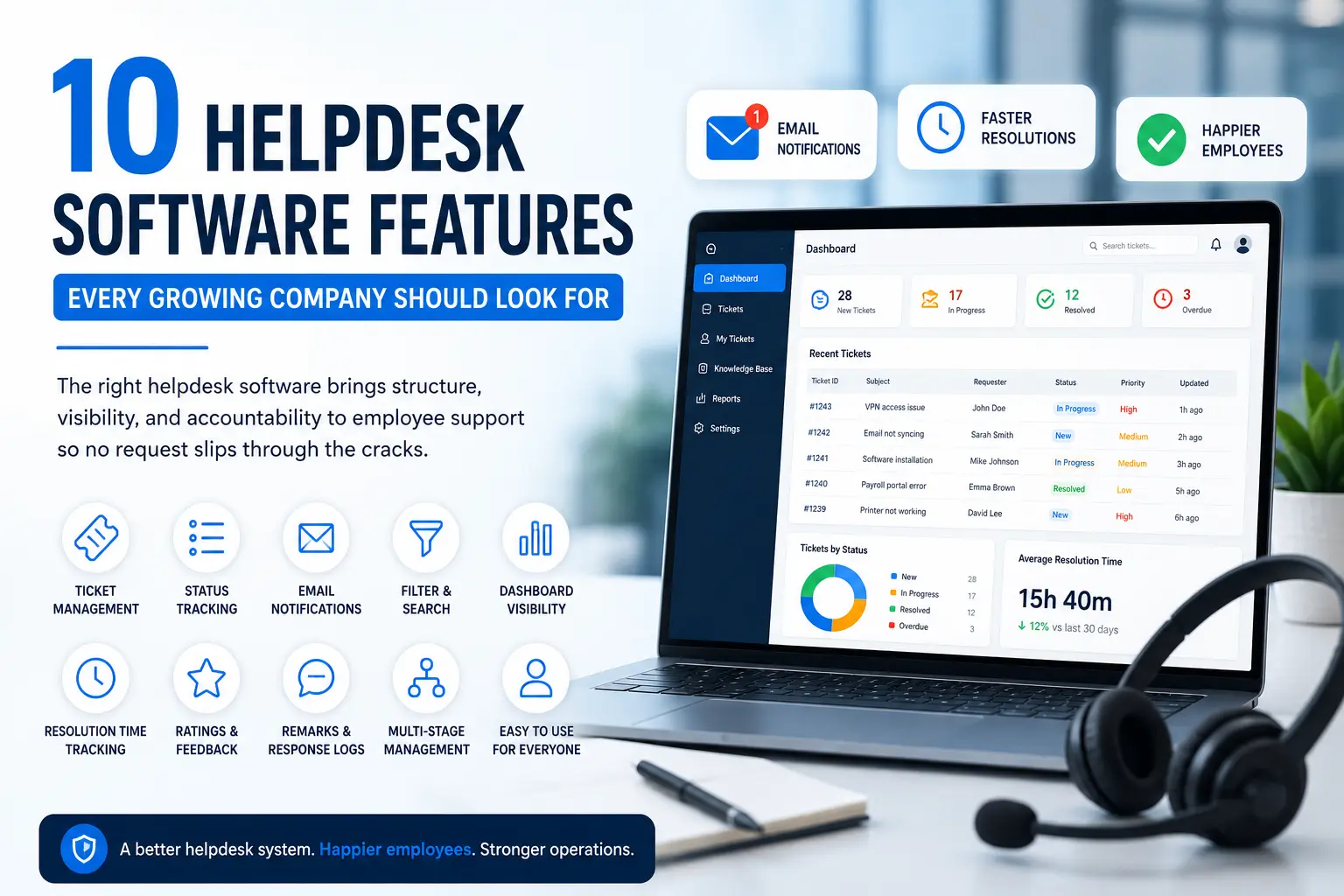
As organizations grow, choosing the right helpdesk platform becomes increasingly important. Understanding these top 10 Helpdesk Software Features can help businesses build a structured support process, improve response times, and ensure employee requests never fall through the cracks.
10 Features to Look for in IT Helpdesk Software
Not all help desk solutions are built the same. When evaluating options, these are the features that separate capable systems from ones that only solve part of the problem.
- Ticket Submission for IT and Admin Requests
Employees should be able to raise both IT issues and administrative requests from one place. A good helpdesk ticketing system captures all request types without requiring employees to navigate multiple channels. - Clear Status Tracking
Every ticket should move through defined stages New, In Progress, Resolved. Employees and support teams alike need to know exactly where a request stands without having to ask. - Email Notifications
Automatic email alerts keep both the submitter and the support team informed. Notifications on ticket submission and on every response eliminate the need for manual follow-up and reduce back-and-forth.
4. Ticket Filtering and Search
- Filter tickets by date range, current status, or request type
- Access remarks, ratings, and resolution history in one view
- Search across open and closed tickets without navigating multiple screens
- Dashboard Visibility
A centralized dashboard gives support teams a real-time view of all active requests and their current status. It removes blind spots and ensures nothing sits unnoticed in a queue. - Resolution Time Tracking
Tracking how long each ticket takes to resolve is critical for identifying bottlenecks. IT helpdesk software that records resolution time helps teams improve their response process over time.
7. Ratings and Feedback
- Employees should be able to rate the support they receive
- Ratings create accountability within the support team
- Feedback data highlights patterns in service quality
- Remarks and Response Logs
Every exchange on a ticket should be recorded. Remarks and response logs create a complete history of each request, which is especially useful for recurring issues or escalations. - Multi-Stage Request Management
Support requests do not always resolve in one step. The helpdesk management system should support multi-stage handling, allowing tickets to move through review, action, and confirmation stages cleanly.
10. No Technical Training Required
- Employees should be able to submit and track tickets without any technical onboarding
- A simple, intuitive interface improves adoption across departments
- Support teams should be able to manage everything from one interface without steep learning curves
How to Choose IT Helpdesk Software for a Growing Company
The features above form the foundation, but choosing the right helpdesk system also depends on how well it fits the way your organization actually operates. A few practical considerations matter here.
First, think about who is submitting requests. If your workforce spans multiple departments IT, HR, administration the software needs to handle different request types without creating separate workflows for each. A unified IT helpdesk ticketing system that covers both IT and non-IT requests reduces friction across the board.
Second, consider how visible the support process is to leadership. Helpdesk solutions that offer filtering, status tracking, and resolution data give decision-makers a clear picture of support performance without requiring manual reporting from the team.
Third, ease of adoption matters as much as feature depth. HR software and HCM software have both learned this lesson: a system only delivers value when employees actually use it. The same applies to helpdesk management systems. Complexity at the point of submission drives employees back to informal channels, which defeats the purpose entirely.
FlowHCM’s Help Desk module is built with these considerations in mind designed for organizations that need structured, trackable employee support without the overhead of complex enterprise tools.
What Good Employee Support Looks Like in Practice
When the right helpdesk system is in place, the experience changes on both sides. Employees submit requests in under a minute, receive an immediate acknowledgment, and can check status at any point without chasing anyone down. Support teams work from a single dashboard, prioritize based on real data, and close tickets with a full record of every interaction.
The difference is not just speed. It is clarity. Everyone knows what has been submitted, what is being worked on, and what has been resolved. That kind of visibility is what transforms support from a frustration point into something employees actually trust.
A capable helpdesk ticketing system does not just manage requests. It builds confidence in the support process, in the tools, and in the organization’s ability to take care of its people.